When you combine Five9 and Salesforce, you unlock one of the most powerful call center tech stacks available today. Both platforms are leaders in their own categories, but together, they become a seamless customer engagement engine. From streamlined dialing to automated follow-ups, this integration improves every step of the contact center workflow.
But getting the most out of this combo requires more than just flipping a switch. To truly harness the power of Five9 and Salesforce, you need to connect them the right way. In this guide, we’ll explore the key benefits, best practices, and strategies for building a smart, high-performance contact center that utilizes both platforms in harmony.
Why Integrate Five9 and Salesforce?
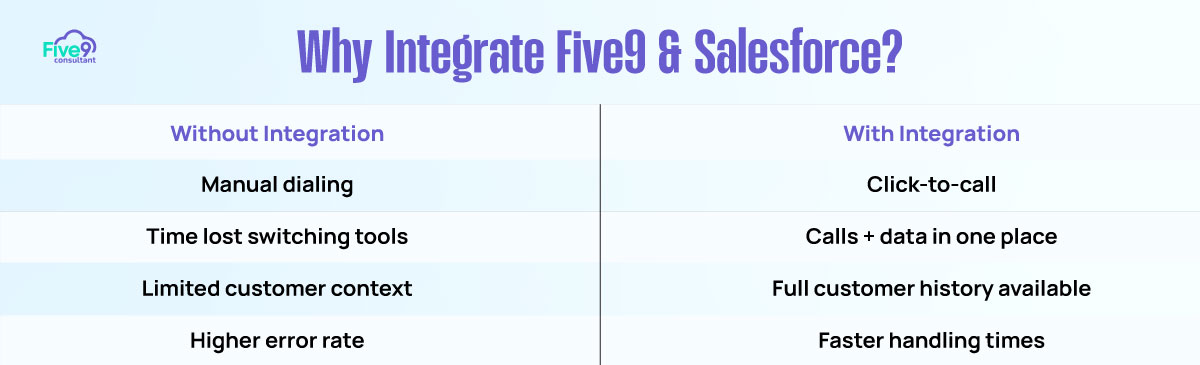
When Five9 and Salesforce are properly connected, they work together to provide an intelligent, data-driven, and efficient customer engagement experience. The result is faster handling times, more context during interactions, and fewer missed opportunities.

Agents can initiate and receive calls directly within Salesforce, view customer history instantly, and log every call with a single click. Meanwhile, managers gain full visibility into performance through real-time dashboards and reports.
This integration reduces manual effort, improves response times, and ensures no interaction goes undocumented.
Key Benefits of Integrating Five9 and Salesforce

One of the most immediate benefits is click-to-call functionality. Once Five9 is embedded into Salesforce, agents can dial contacts, leads, and accounts with a single click from any record. This eliminates dialing errors and saves valuable time, especially for high-volume sales or support teams.
Another major benefit is the screen pop feature. When a customer calls in, Five9 automatically pulls up the associated Salesforce record. Agents instantly see key details such as past activity, open opportunities, and previous call logs. This context allows for smoother conversations and faster resolutions.
The integration also supports auto-logging of call outcomes. After a call ends, the agent’s notes and call disposition can be logged directly to the related Contact, Lead, or Opportunity. This ensures accurate recordkeeping and enables better forecasting.
In addition, you can use Salesforce dashboards to generate real-time reports using Five9 data. These dashboards help you track key performance indicators, including call volume, conversion rates, follow-up completion, and agent activity, across the entire pipeline.
Best Practices for a High-Performance Five9 and Salesforce Integration
To take full advantage of this integration, you’ll want to go beyond the basics. Start by using Five9’s Open CTI integration. Open CTI offers a native softphone experience within Salesforce, allowing agents to manage calls, access tools, and view customer data all within a single window. This eliminates context-switching and boosts productivity.
It’s also important to sync call dispositions to custom fields in Salesforce. By tying disposition codes to specific lead or opportunity stages, you create more granular tracking and better forecasting accuracy. For example, dispositions like “Interested – Follow Up” or “Demo Scheduled” can trigger status changes or workflow rules.
Utilize Salesforce Lightning components to embed the Five9 interface directly within record pages. This means agents can access Five9 features without having to navigate away from the lead or case they’re working on. It reduces friction and helps teams stay focused.
Another powerful tip is to automate follow-up tasks using Salesforce Flows. When a call ends with a specific disposition, you can set a Flow to automatically create a task, assign a user, or send a follow-up email. These automations keep your pipeline moving and ensure no lead or request falls through the cracks.
It’s More Than Integration, It’s Orchestration
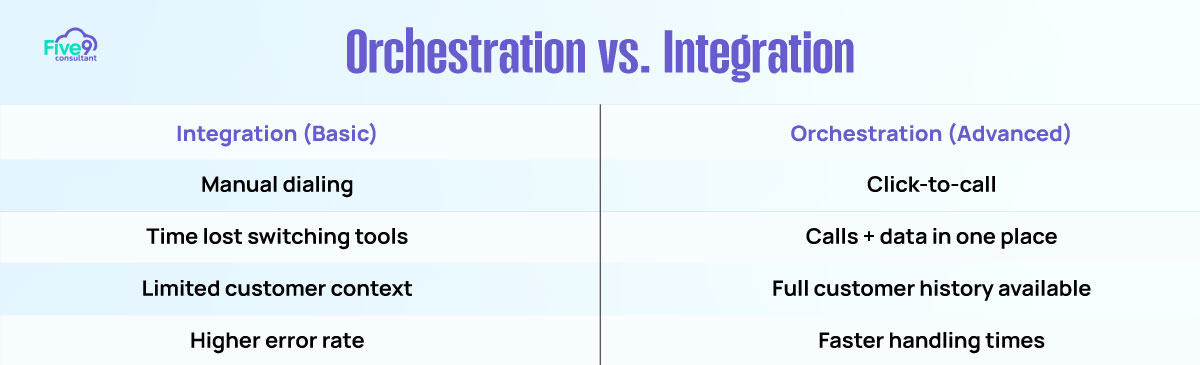
Connecting Five9 and Salesforce is not just about syncing two tools; it’s about integrating them to drive seamless collaboration and productivity. It’s about orchestrating your call center workflows so everything works in harmony. When you configure them strategically, they become an extension of your team, handling repetitive tasks, surfacing valuable insights, and enabling agents to focus on what matters most — delivering exceptional customer experiences.
This orchestration turns Salesforce into a command center and Five9 into the communication backbone. Together, they give you unmatched control, visibility, and flexibility to grow your business.
Make Five9 and Salesforce Work Smarter Together
The Five9 and Salesforce integration has the power to transform how your contact center operates. From dialing efficiency and faster resolutions to automation and better reporting, this combo delivers value across sales, support, and service teams.
To get the most out of it, you need to connect the platforms intentionally. This involves embedding the Five9 softphone, syncing key data points, utilizing Flows for follow-ups, and utilizing dashboards for real-time insights.
When you align your tools around your workflows, you’re not just creating an integration. You’re building an ecosystem where your agents are more productive, your customers are more satisfied, and your operations are more scalable.